Swagger documentation - https://api.infact.no/docs/index.html
Campaign API provides a set of methods to create simple one-time campaigns or put recipients to a campaign data source for later sending campaigns manually.
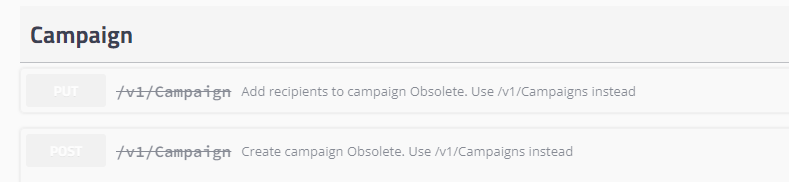
PUT/v1/Campaign
Add recipients to campaign Obsolete. Use /v1/Campaigns instead
POST/v1/Campaign
Create campaign Obsolete. Use /v1/Campaigns instead
¶ URL
resource URL - https://api.infact.no/%7BversionNo%7D/Campaigns
versionNo - version of API (last version: v1)
Campaign- name of resource to access
¶ Authorization
Require Bearer Authentication.
Authorization: Bearer <token>
To get a token - use Account API with Basic authorization header
`GET /v1/Account/token
¶ Campaign API methods
| URL | HTTP method | Short description |
| /campaigns | POST |
|
¶ Example
{
    "Recipients": [
      {
        "additionalProp1": {},
        "additionalProp2": {},
        "additionalProp3": {}
      }
    ],
    "ExternalId": "string",
    "Type": "SMS",
    "Priority": "SMS",
    "Name": "string",
    "ScheduleDate": "2023-11-28T09:02:06.590Z",
    "AllowDuplicates": true,
    "SMSTemplateId": 0,
    "CountryCode": "string",
    "PhoneName": "string",
    "EmailName": "string",
    "EmailTemplateId": 0,
    "EmailSubject": "string",
    "SMSBlackList": {
      "Type": "None",
      "BlackListIds": [
        0
      ],
      "FormIds": [
        0
      ]
    },
    "EmailBlackList": {
      "Type": "None",
      "BlackListIds": [
        0
      ],
      "FormIds": [
        0
      ]
    }
}¶ Model
| Field | Required | Type | Variable name | Description |
| Recipients | YES | string | Campaign recipients | |
| ExternalId | No |
string maxLength: 255 minLength: 1 |
ExternalId for Campaign | |
| Type | Yes | string |
Refers to CampaignType: 1 - Automatic, 2 - Manual, 3 - Transactional |
|
| Priority | No | string | Campaign recipient priority type Required when CampaignType is EmailAndSMS Ignored when CampaignType is SMS or Email | |
| Name | Yes |
string maxLength: 255 minLength: 1 |
Campaign Name | |
| ScheduleDate | No | string($date-time) | ||
| AllowDuplicates | No | Boolean | If set True or 1 it will allow sending SMS and/or Email to the same recipient (phone number or e-mail address). Default value = 0 (exclude duplicates from a recipient list) | |
| EmailName | Yes/No |
string maxLength: 200 minLength: 1 |
Name of email column | |
| EmailTemplateID | Yes/No |
integer($int64) maximum: 2147483647 minimum: 1 |
Id of Email template | |
| EmailSubject | Yes/No | string |
E-mail subject
|
|
| SMSTemplateId | Yes/No |
integer($int64) maximum: 2147483647 minimum: 1 |
Id of SMS template | |
| CountryCode | Yes/No | string maxLength: 2 minLength: 2 |
Country code in ISO 3166-1 alpha-2 format E.g. NO for Norway, SE for Sweden |
|
| PhoneName | Yes/No | string maxLength: 200 minLength: 1 |
Name of email column | |
| SMSBlackList | No |
string Blacklist type Enum: BlackListIds [Set of blacklists id] FormIds [Set of forms id] |
||
| EmailBlackList | No |
string Blacklist type Enum: BlackListIds [Set of blacklists id] FormIds [Set of forms id] |
||
¶ Obsolete API requests
¶ URL
resource URL - https://api.infact.no/%7BversionNo%7D/Campaign
versionNo - version of API (last version: v1)
Campaign- name of resource to access
¶ Authorization
All Service calls require authentication.
Now it uses Basic HTTP authentication, so it’s needed an Authorization HTTP header.
The Authorization header is constructed as follows:
Username and password are combined into a string "username:password"
The resulting string is then encoded using the RFC2045-MIME variant of Base64, except not limited to 76 char/line
The authorization method and a space i.e. "Basic " is then put before the encoded string.
ClientId - some API requests require the parameter ClientId. Contact Infact to get it.
Example:
Authorization: Basic QWxhZGRpbjpvcGVuIHNlc2FtZQ==
Please contact Infact support to enable access to API, get login, password and ClientId.
¶ Campaign API methods
| URL | HTTP method | Short description |
| /campaign | POST |
|
| /campaign | PUT | Put recipients to previously created campaign data-source container |
¶ Campaign type differences
¶ CampaignType parameter definition
| Name | Value |
| Automatic (one-time campaign) | 1 |
| Manual (campaign datasource) | 2 |
| Transactional | 3 |
Automatic one-time campaign - via the API you create an automatic one-time campaign that can be sent immediately or scheduled to a specific date and time.
Campaign data source - via the API you save a list of recipients into a simple data source. The data source will be available on the first step of Campaign Wizard (Step 1 → Choose databases → Datasources) while sending campaigns manually.
Transactional - create an automatic one-time campaign that can be sent immediately or scheduled to a specific date and time, but only with one recipient. The campaign will be sent immediately (or created if it is scheduled) avoiding a normal processing queue and corresponding delays. Can be used for sending one-time codes or immediate alerts.
When CampaignType = 3 (Transactional) is used, the “Recipients” field is mandatory and must contain exactly one recipient. The Campaign will be sent immediately, will not be displayed in the “Automatic campaigns” folder, and will not have a statistic.
¶ Sending an Automatic one-time campaign and Transactional campaign
This workflow shows how to create and send basic campaigns via the API.
Campaign parameters and recipient list send in one request. The campaign processes via queue-based default flow that allows to avoid API overloading.
¶ Workflow
"CampaignType": 1 - parameter for sending automatic one-time campaign
"CampaignType": 3 - parameter for sending transactional campaign. The “Recipients” field is mandatory and must contain exactly one recipient. The Campaign will be sent immediately, will not be displayed in the “Automatic campaigns” folder, and will not have a statistic.
POST https://api.infact.no/v1/Campaign/
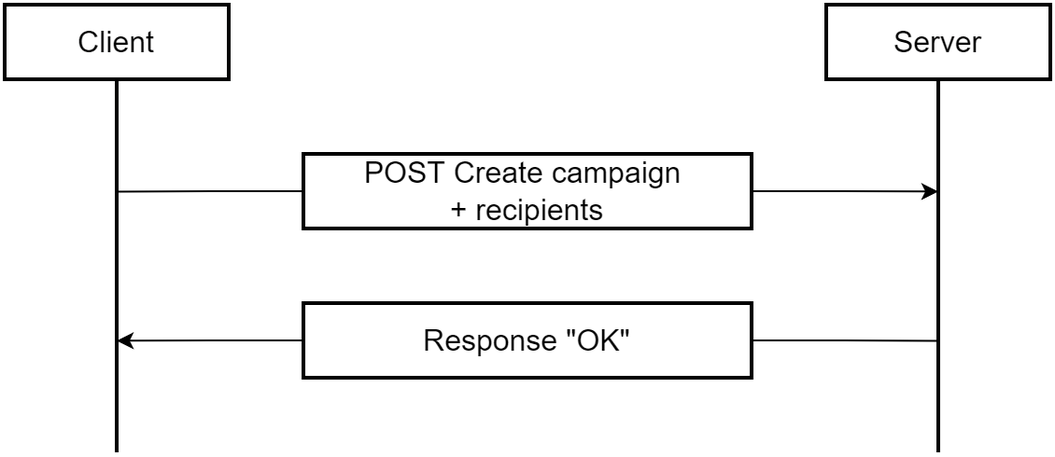
Campaign priority types: 1 - Email, 2 - SMS
If one of campaign priorities is SMS - parameter "SMSTemplateId" is required
if one of campaign priorities is Email - parameters "EmailTemplateId" and "EmailSubject" are required
Campaign priority fields - "Priority1", "Priority2"
SMS and Email priorities workflow
With campaign priority fields ("Priority1", "Priority2") you set up a main communication channel priority for the campaign.
if "Priority1": 2, "Priority2": 1 - SMS channel is preferred for campaign.
if "Priority1": 1, "Priority2": 2 - Email channel is preferred.
Recipient communication channel consents
The API checks channel settings for every recipients.
"SMSEnabled": 0 or 1
"EmailEnabled": 0 or 1
If a recipient doesn’t allow to send SMS by parameter "SMSEnabled": 0 or phone number is not valid - SMS will not be sent. Same for email channel.
Example: Automatic one-time campaign (same for transactional, but "CampaignType": 3 and only one recipient in recipients object)
POST https://api.infact.no/v1/Campaign/ - apiCampaign model
{
 "AllowDuplicates": false,
 "clientID": "DemoKundeAPiId",
 "campaignId": "17",
 "StartDate": "2022-05-20",
 "ClosingDate": "2022-05-30",
 "CampaignType": 1,
 "Priority1": 2,
 "Priority2": 1,
 "Name": "TestAPI Automatic 21-06-2022",
 "SmsTemplateId": 6582,
 "EmailTemplateId": 9835,
 "EmailSubject": "TestAPI Automatic 21-06-2022Subject",
 "Recipients": [
   {
     "UserId": "11111",
     "FirstName": "Maksym",
     "LastName": "string",
     "CoAddress": "Ruglandveien 00",
     "ZipCode": "1358",
     "City": "Jar",
     "CellularPhone": "+4791901360",
     "Email": "maksym@infact.no",
     "EmailEnabled": 1,
     "SMSEnabled": 0,
     "Custom": {
       "somenummer": "01212",
       "additionalProp2": "string"
     }
   }
 ]
}¶ Campaign data sources
It’s possible to create campaign data sources and treat them as a pre-saved recipient list for sending manual campaigns. The created campaign data source is available on the “Choose recipients” step of Campaign Wizard while sending campaigns manually.
¶ Workflow
"CampaignType": 2 - parameter for creating campaign data source
¶ For relatively small campaign data sources
POST https://api.infact.no/v1/Campaign/
.png)
There is a restriction on the total content size for POST HTTP method.
¶ With no restrictions to recipient list length
POST https://api.infact.no/v1/Campaign/
PUT https://api.infact.no/v1/Campaign/
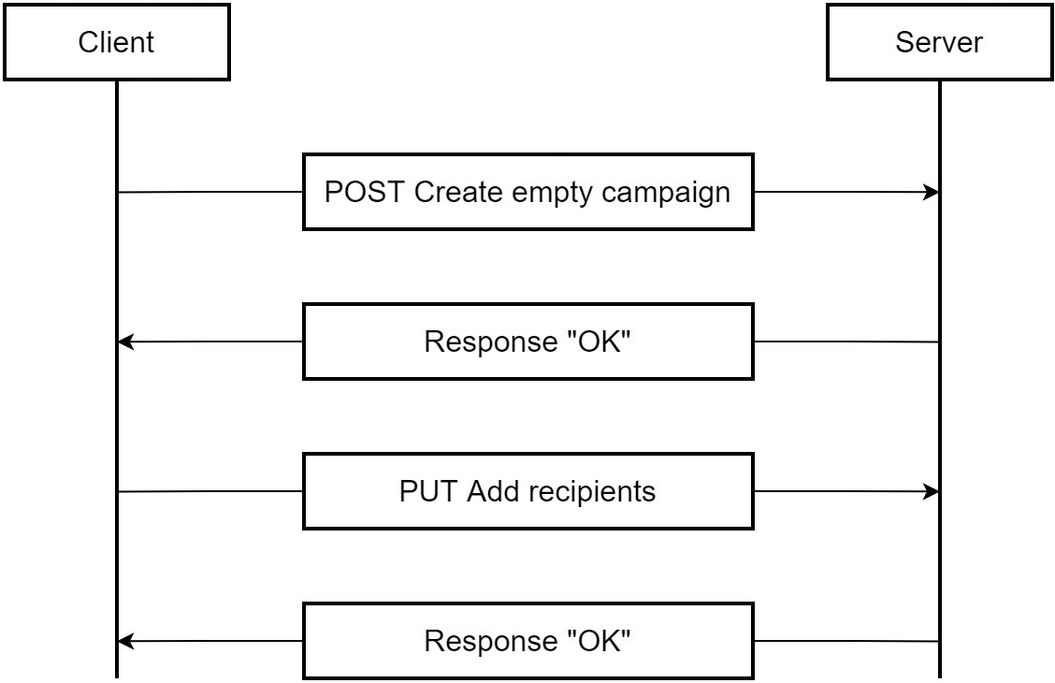
Example: Create campaign data source (pre-saved list of recipients)
POST https://api.infact.no/v1/Campaign/ - apiCampaign model
{
 "AllowDuplicates": false,
 "clientID": "DemoKundeAPiId",
 "campaignId": "18",
 "StartDate": "2022-05-20",
 "ClosingDate": "2022-05-30",
 "CampaignType": 2,
 "Name": "TestAPI Automatic 21-06-2022"
}2. PUT https://api.infact.no/v1/Campaign/ - apiCampaign + apiRecipients model
{
 "AllowDuplicates": false,
 "clientID": "DemoKundeAPiId",
 "campaignId": "18",
 "Recipients": [
   {
     "UserId": "11111",
     "FirstName": "Maksym",
     "LastName": "string",
     "CoAddress": "Ruglandveien 00",
     "ZipCode": "1358",
     "City": "Jar",
     "CellularPhone": "+4791901360",
     "Email": "maksym@infact.no",
     "EmailEnabled": 1,
     "SMSEnabled": 0,
     "Custom": {
       "somenummer": "01212",
       "additionalProp2": "string"
     }
   }
 ]
}¶ Object definitions
¶ apiCampaign object
POST https://api.infact.no/v1/Campaign/
model
{
 "AlreadyGeneratedCouponCode": true,
 "ClientId": "string",
 "CampaignId": "string",
 "ChainId": "string",
 "AllowDuplicateCampaignId": true,
 "AllowDuplicates": true,
 "PartCount": 0,
 "CampaignType": 0,
 "Priority1": 0,
 "Priority2": 0,
 "Name": "string",
 "Description": "string",
 "ScheduleDate": "2022-06-21T09:58:04.188Z",
 "StartDate": "string",
 "ClosingDate": "string",
 "EmailTemplateId": 0,
 "EmailSubject": "string",
 "SMSTemplateId": 0,
 "BlackList": 0,
 "CouponCode": "string",
 "DiscountType": 0,
 "CouponPercentage": "string",
 "CouponAmount": "string",
 "CouponValidityPeriod": 0,
 "CouponValidityDate": "string",
 "Recipients": [
   {
     "UserId": "string",
     "FirstName": "string",
     "LastName": "string",
     "CoAddress": "string",
     "MailingAddress": "string",
     "ZipCode": "string",
     "City": "string",
     "CountryCode": "string",
     "CellularPhone": "string",
     "Phone2": "string",
     "Phone3": "string",
     "Phone4": "string",
     "Phone5": "string",
     "Email": "string",
     "EmailEnabled": 0,
     "SMSEnabled": 0,
     "RefShop": "string",
     "RegNr": "string",
     "Brand": "string",
     "Model": "string",
     "CurrentBonusAmount": 0,
     "Bonustype": 0,
     "QualifyingbonusAmount": 0,
     "NumberOfBonusChecks": 0,
     "TotalValueBonusChecks": 0,
     "PointBalance": 0,
     "PointsUntilNextLevel": 0,
     "Level": 0,
     "LevelDescription": "string",
     "Custom": {
       "additionalProp1": "string",
       "additionalProp2": "string",
       "additionalProp3": "string"
     }
   }
 ]
}
| Field | Required | Type | Variable name | Description |
| ClientID | YES | string | Unique identifier for a user | |
| SMStemplateID | Yes/No | int |
SMS template Id to be used in a campaign. Required if "Priority1" or "Priority2" = 2 (SMS channel) Not required and not needed if |
|
| CampaignType | Yes | int |
Refers to CampaignType: 1 - Automatic, 2 - Manual, 3 - Transactional |
|
| PartCount | No | int | Only for "CampaignType" = 2. This is a number of recipients parts that will be added to Campaign Data source by PUT method. Default value = 0 (means only only one recipients part is expected. Equal to PartCount = 1) |
|
| Recipients | Yes/No | APIRecipients | Not required and not needed if "CampaignType" = 2. |
|
| Name | No | string | Name of campaign. To be used as Campaign Name in campaign list (folder “Automatic campaigns”) + as campaign datasource name for manual campaigns. If Name is not specified, then CampaignId is used as Name. | |
| AllowDuplicates | No | boolean | If set True or 1 it will allow sending SMS and/or Email to the same recipient (phone number or e-mail address). Default value = 0 (exclude duplicates from a recipient list) | |
| CampaignID | Yes | string | Identity of campaign | |
| EmailTemplateID | Yes/No | int |
Email template Id to be used in a campaign. Required if "Priority1" or "Priority2" = 1 (Email channel) Not required and not needed if |
|
| EmailSubject | Yes/No | string |
E-mail subject. Required if "Priority1" or "Priority2" = 1 (Email channel) Not required and not needed if |
|
| ScheduleDate | No | string | Date in format yyyy-MM-dd HH:mm:ss . Specified the scheduled date and time if we want to plan a campaign. The campaign will run not immediately but at the time and date specified in this parameter. Example: "2022-06-20 14:30:18" |
|
| Priority1 | No | int |
Channel priority: 1 - Email, 2 - SMS Not required and not needed if |
|
| Priority2 | No | int |
Channel second priority: 1 - Email, 2 - SMS Not required and not needed if |
|
| StartDate | Yes | string | %%StartDate%% | Campaign start date in the format yyyy-MM-dd. Only used as variable to be inserted into SMS/Email campaign text. |
| ClosingDate | Yes | string | %%ClosingDate%% | Campaign stop date in the format yyyy-MM-dd. Only used as variable to be inserted into SMS/Email campaign text. |
¶ APIRecipients object
PUT https://api.infact.no/v1/Campaign/
model
{
  "ClientId": "string",
  "CampaignId": "string",
  "PartNumber": 0,
  "Recipients": [
    {
      "UserId": "string",
      "FirstName": "string",
      "LastName": "string",
      "CoAddress": "string",
      "MailingAddress": "string",
      "ZipCode": "string",
      "City": "string",
      "CountryCode": "string",
      "CellularPhone": "string",
      "Phone2": "string",
      "Phone3": "string",
      "Phone4": "string",
      "Phone5": "string",
      "Email": "string",
      "EmailEnabled": 0,
      "SMSEnabled": 0,
      "RefShop": "string",
      "RegNr": "string",
      "Brand": "string",
      "Model": "string",
      "CurrentBonusAmount": 0,
      "Bonustype": 0,
      "QualifyingbonusAmount": 0,
      "NumberOfBonusChecks": 0,
      "TotalValueBonusChecks": 0,
      "PointBalance": 0,
      "PointsUntilNextLevel": 0,
      "Level": 0,
      "LevelDescription": "string",
      "Custom": {
        "additionalProp1": "string",
        "additionalProp2": "string",
        "additionalProp3": "string"
      }
    }
  ]
}
| Field | Required | Type | Variable Name | Description |
| UserId | Yes | string | %%UserId%% | |
| EmailEnabled | Yes | Int | %%EmailEnabled%% | Defines if the email can be sent: 0 = No, 1 = Yes |
| SMSEnabled | Yes | Int | %%SMSEnabled%% | Defines if the SMS can be sent: 0 = No, 1 = Yes |
| No | string | %%Email%% | email address. If email is empty the recipient will not get an email | |
| CountryCode | No | string | %%CountryCode%% | Country code, according to ISO standard. It’s needed to substitute country code if Mobile phone number is in a short format, e.g. 919013xx, and not +47919013xx |
| CellularPhone | No | string | %%CellularPhone%% | Mobile phone number |
| Phone2 | No | string | %%Phone2%% |
If Phone2,3,4,5 has value, then Priority looking for a phone number is as follows: 1. CellularPhone, 2. Phone2, 3. Phone3, 4. Phone4, 5. Phone 5 Number encoding is done based on the customer country set in PartnerAdmin |
| Phone3 | No | string | %%Phone3%% | |
| Phone4 | No | string | %%Phone4%% | |
| Phone5 | No | string | %%Phone5%% | |
| FirstName | No | string | %%FirstName%% | |
| LastName | No | string | %%LastName%% | |
| CoAddress | No | string | %%CoAddress%% | |
| MailingAddress | No | string | %%MailingAddress%% | |
| ZipCode | No | string | %%ZipCode%% | |
| City | No | string | %%City%% | |
| RefShop | No | string | %%RefShop%% | Reference store |
| RegNr | No | string | %%RegNr%% | Brand name |
| Brand | No | string | %%Brand%% | Model name |
| Model | No | string | %%Model%% | |
| Custom | No | No Object | %%Custom.customProp%% | Object with any number of properties. If template contains variable e.g. %Custom.FlightNumber%, but Custom object does not contain property “FlightNumber”, variable in the template will be replaced with empty string. |