¶ Overview
This guide provides an overview of Segment statuses in BRP's retention module. There are three statuses for every segment: Confirmed, Inbound, and Outbound.
A person/group of persons may have one of the following statuses:
- Inbound: This status applies to a person who has entered a segment, but has not been imported into Infact. This status is not visible in our system as it changes to Confirmed once the person is imported.
- Confirmed: This status applies to a person who is currently in the segment and has been imported into Infact.
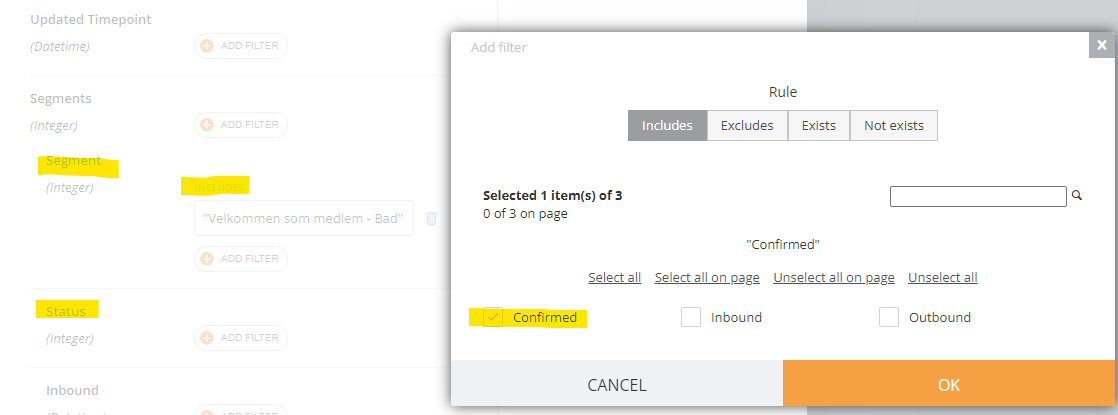
To see the people who are currently in the segment, filter by the segment and then filter by the Confirmed status.
- Outbound: This status applies to a person who has fallen out of the segment because they no longer match the segment filter. The number of people in this status will always grow as people move from Confirmed to Outbound.
¶ Example
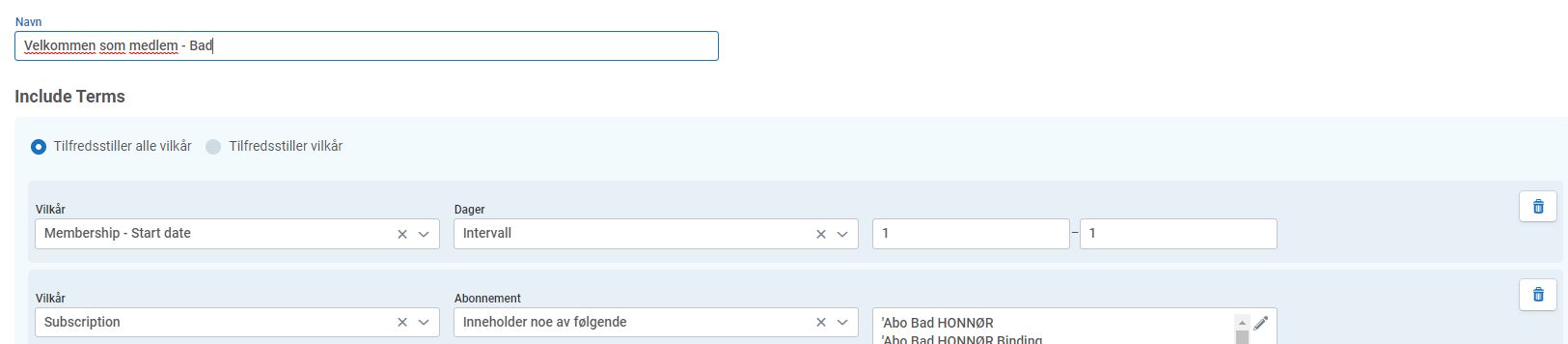
Let's take the example of a segment in BRP called "Velkommen som medlem," which represents people who signed a contract one day ago.
To filter by people who signed the contract exactly one day ago, use the "Membership - Start date" filter and set the interval to 1 to 1, as shown in the screenshot below.
If a person signed the contract on May 7th, 2023, they will have the following statuses:
- Inbound: This status applies to the person from 00:00 on May 8th, 2023, until the moment they are imported into Infact.
- Confirmed: This status applies to the person once they are imported into NGD and they are currently in the segment.
- Outbound: This status applies to the person at 23:59 or 00:01 +/- 10 minutes on May 9th, 2023. The person will no longer be in the segment because they will not match the filter.
¶ Tips
To filter by people who are currently in the segment, filter by the segment and then filter by the Confirmed status.
¶ Conclusion
Segment statuses in BRP's retention module are essential to keeping track of the people who, e.g. signed contracts and are in the segment.
By understanding the different statuses, you can easily filter and find the people you need.